
Your thinking, on your own disk.
An offline canvas for Mac. Every card is a plain Markdown file in a folder you choose.
Apple silicon · $9 one time · No account
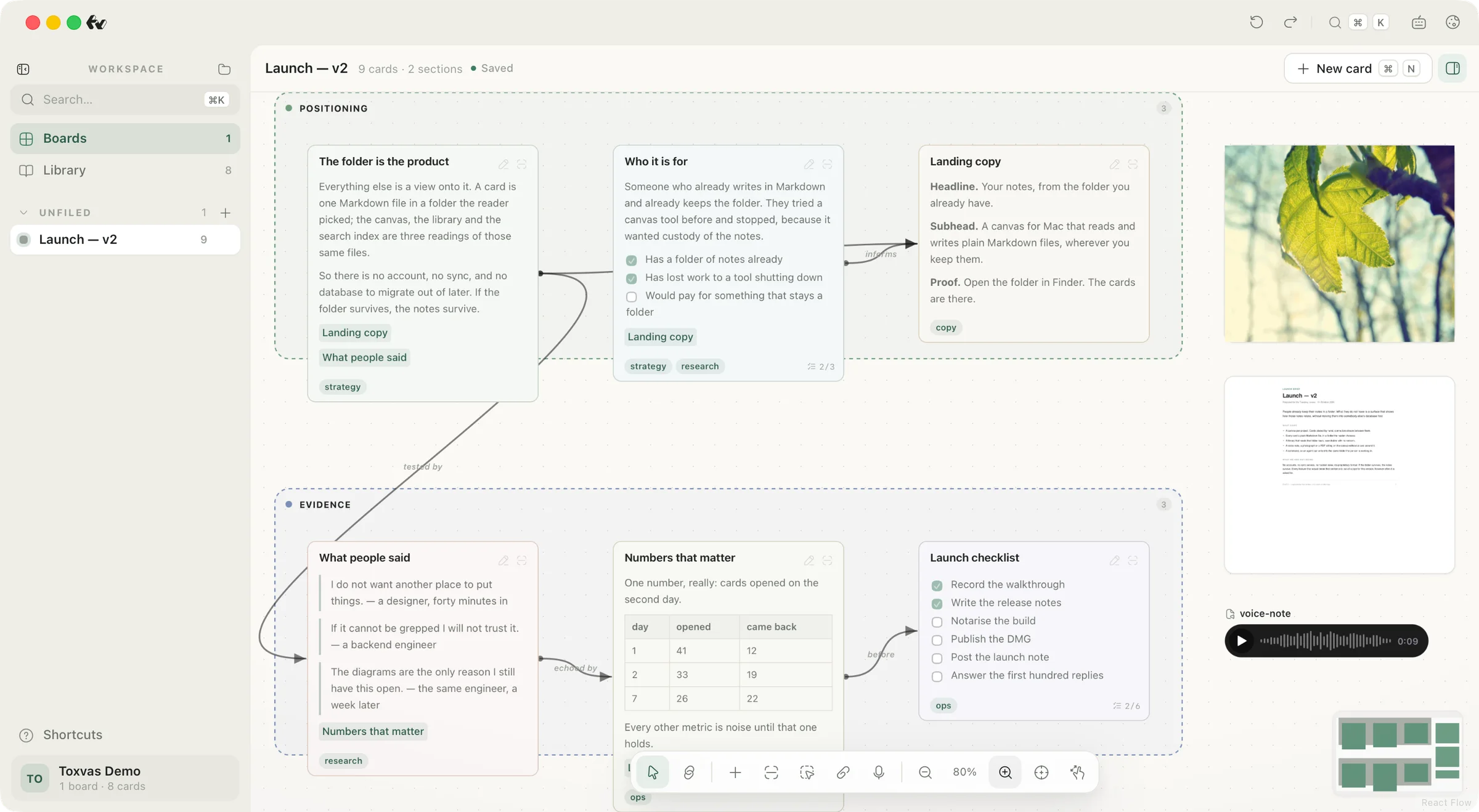
What a card can hold
The body is Markdown, rendered as Markdown. The board around it holds what Markdown cannot: the files themselves.
Each panel below is the real thing, running. Nothing here is a picture of it.
The body is Markdown, rendered as Markdown.
Headings, lists, tables, quotes and code fences all render in place. The frontmatter stays editable in any editor.
Record a note on the board.
Press, talk, release. It lands in attachments/ like any other file.
Drop a file on the board.
A photo, a PDF's real first page, a voice note. No card around it.
⌘K, and you never touch the mouse.
The palette runs the app's own commands — new card, new board, rename, go to boards, go to library, fit whole board.
Search runs on the whole folder.
FTS5 over every card file. The index is local, so search answers with the network off.
Landing copy
Headline. Subhead. Proof. The bit nobody believes until they read it twice.
The funnel
Card to file to folder, and what each one is for.
Evidence
The six numbers the business case actually rests on.
What people said
Six quotes. Two of them are about the keyboard.
Launch checklist
Nine tasks, in the order they have to happen.
Every card, in one grid.
Five cards, one folder. Every one of them is a Markdown file you could open in any editor.
A folder, not a database.
Toxvas writes a spec into the folder the first time you open it. After that there is nothing to configure, nothing to migrate out of, and nothing that only the app can read.
~/Documents/Toxvas -
TOXVAS_SPEC.mdthe format, written down -
cards/one Markdown file each -
boards/canvas layout per board -
attachments/any file type
Open it in Finder Read it in any editor Keep it in Git Delete the app, keep the notes
Give your agent the whole board.
No API key, no MCP server, no account. Any agent that can run a shell can read and write the board, with the app closed.
Toxvas — agent session● Reading 2 cards⎿ “Landing copy” · 3 outgoing links⎿ “Zinc alloy notes”● JSON out, exit 1 2 3 when a step fails, --dry-run on every write, and the canvas follows in ~2s.
One Mac app. One folder you own.
Buy it once and it is yours. No subscription and no account. Uninstall the app and the notes are still there, in plain text.
- The Mac app: boards, the Library, search and ink connectors.
- The toxvas command, for a shell and for an agent.
- Your files: plain Markdown in a folder you own.
Toxvas
Early access
one-time · early access
Download for MacApple silicon · Nothing leaves your Mac